


Outback Steakhouse
4.74.98K Reviews
App Specs
- Version
- 5.18.0
- Updated On
- License
- Free
- Downloads
- 1,000,000+
- Developer
- Outback Steakhouse of Florida, LLC
- Categories
- Food & Drink
- Platform
- Android, iOS
Screenshots
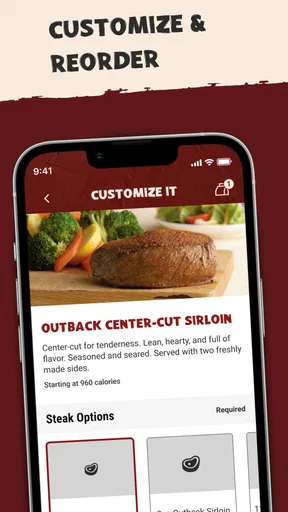
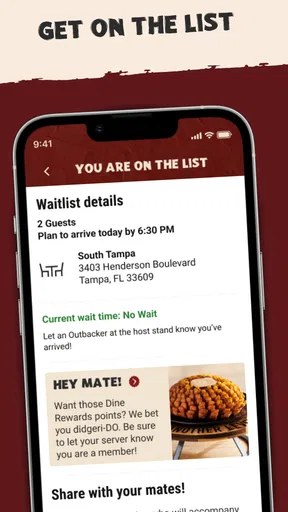
 Analysis by AppCompare
I tend to think about the Outback Steakhouse app less as a substitute for visiting the restaurant and more as a way to make the visit easier to plan. It is a free Food & Drink app from Outback Steakhouse of Florida, LLC, and its best use is practical: checking what you can order, deciding where to go, and handling a meal without having to start from scratch at the counter. I would recommend it most to people who already enjoy Outback and expect to visit again, rather than someone looking for a general restaurant-discovery tool.
When the connection matters
The app’s usefulness depends on when you have a working connection. Looking through the menu or preparing an order is most convenient before you leave home, when you have time to read options and make choices without holding up anyone else. If you wait until you are hungry, standing outside a restaurant, or already trying to coordinate a group, a slow connection can turn a simple task into an annoying pause. I’d treat it as a planning aid and have a backup plan for the actual meal, especially if timing matters.
A useful habit is to settle the important decisions before you reach the restaurant: choose the location, review the menu, and talk through any substitutions with your group. That does not guarantee every choice will be available at every location, but it does help you avoid making decisions in a rush. For a familiar order, this is an easy way to reduce back-and-forth; for a first visit, taking a moment to read the options is more valuable than tapping through quickly.
Using it on the move
On a phone, the app fits naturally into small moments: checking options during a lunch break, deciding where to meet after work, or looking up a nearby restaurant while making plans. The location feature can help narrow down where to go, and the app is more useful when you already know the kind of meal you want than when you are still comparing many unrelated restaurants. If you are driving, let a passenger handle the phone or wait until you are parked; finding a restaurant should not become a distraction.
For a family meal, I would use the menu and nutrition information before leaving, so anyone with preferences or dietary questions has time to look. For a quick solo lunch, the ordering flow may be more attractive because there are fewer choices to coordinate. In either case, it is worth checking that the selected restaurant is the one you intend to visit before committing to an order. A little attention to that detail can prevent the common mix-up of planning around the wrong location.
What to do when a step stalls
Mobile ordering is most helpful when each step works smoothly, but a restaurant app can feel less dependable when your connection is weak or you are switching between places. If a screen takes longer than expected, I would avoid repeatedly tapping a payment or submission control; first check whether the earlier action completed, then retry only when you understand what happened. That cautious approach is especially sensible when placing an order, where duplicate actions are more frustrating than taking a moment to confirm.
If the app does not get you to the information you need, the simplest recovery is to ask the restaurant directly or use the usual in-person ordering route. That is not a knock against the app; it is a reminder that a digital shortcut should stay a shortcut, not become the only plan. I would also review the order carefully before sending it, particularly when adding a request or choosing items for several people. Clear choices up front are easier for everyone than trying to correct a rushed order afterward.
Worth Reading Before You Choose

EA SPORTS FC Mobile 26 Is a Bigger Football Game, but It Takes Time

Flipboard Shows What News Apps Must Do Beyond the Feed

Switching to Android Auto Means Rethinking Your Driving Routine

Google Calendar Makes a Crowded Week Easier to Manage

Ludo King Makes the Most of the Minutes Between Plans

Baby Panda World Brings Quick Play to Modern Phones, but Its Game Library Feels Busy
Keeping the phone experience manageable
Because this is a restaurant app, I would use it when I have a specific Outback decision to make rather than keep it open as a general food browser. That makes the experience more purposeful and avoids spending time scrolling when I could be comparing nearby restaurants in a maps or search app. If you are watching mobile data, do the menu browsing and planning while connected to a trusted network where practical, then open the app again when you need to act. The key trade-off is convenience: the app brings Outback-related tasks together, while broader search tools are better for weighing many restaurants at once.
The app is free, has an Everyone age rating, and has a 4.7 average from around 25,000 ratings. It has passed one million installs, which suggests it is a familiar option for many diners, though popularity alone does not guarantee that it suits every occasion. Its current version is 5.15.0 and it requires iOS 11 or later. If you are deciding whether to install it, the clearest reason is repeat use: having Outback’s ordering and location tools in one place can be worthwhile if you already go there. If you only visit rarely, a general maps app and ordering at the restaurant may be enough.
My overall take is that the app works best when it helps you make a straightforward decision before the meal: where to go, what to order, and what details to check. It is less compelling if your main goal is to discover unfamiliar places or compare a broad range of menus. Outback’s app is a focused companion to one restaurant, and that focus is both its strength and its limit.
If you’ve ever craved the taste of a juicy steak or some blooming onions, you're probably familiar with Outback Steakhouse. But did you know there's an app that can bring all the Aussie goodness right to your fingertips? Yep, the Outback Steakhouse app is here to make your dining experience smoother than ever. I decided to give it a whirl, and here's how it went.
Easy Navigation and User-Friendly Design
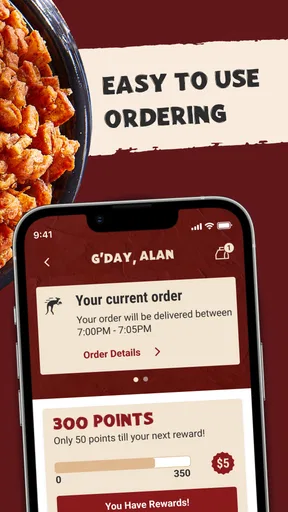
First off, let’s talk about the app’s design. When I opened it for the first time, I was pleasantly surprised by its clean and intuitive layout. The developers have kept things simple, which is exactly what you want when you’re hungry and not in the mood to fiddle with complex menus. The homepage offers quick access to key features, so you're never more than a tap away from what you need.
Order with a Few Taps
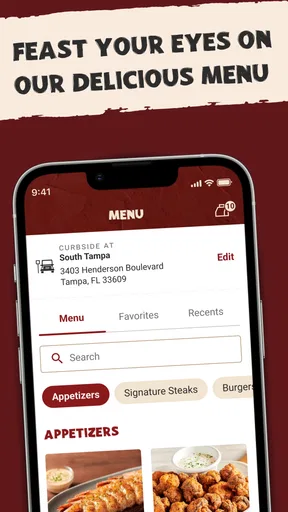
One of my favorite features of the app is the easy ordering system. Whether you're dining in or taking out, the app makes it a breeze to customize your order. You can scroll through the menu, select your favorite dishes, and even add special instructions. Want extra cheese on that Alice Springs Chicken? No problem. The app handles it all without breaking a sweat.
Loyalty Rewards and Offers
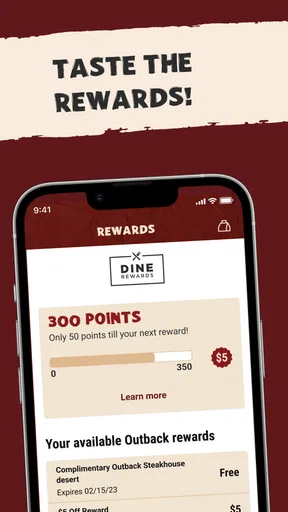
Who doesn’t love a good deal? The app offers a loyalty program that rewards you for your purchases. I found it super easy to sign up and start earning points. Plus, they frequently drop exclusive offers and discounts directly in the app. It’s like having a little Aussie leprechaun bringing you deals straight from down under.
Find Your Nearest Location
When you're craving a steak, the last thing you want is to spend time searching for the nearest Outback. The app’s location feature quickly finds your closest restaurant and provides directions. You can even check out the wait time, which is a lifesaver on those busy Friday nights.
Feedback and Customer Service
I’ve got to hand it to them; the app makes it super easy to leave feedback. After my last meal, I used the feature to comment on the excellent service I received, and I got a quick response thanking me for the input. It's little things like this that make a big difference in the overall experience.
Special Features
Beyond the basics, the app offers a few nifty extras. There’s an allergy guide that ensures you can dine safely if you or a family member has dietary restrictions. Plus, you can also access nutritional information for all menu items, which is great if you’re watching your calories.
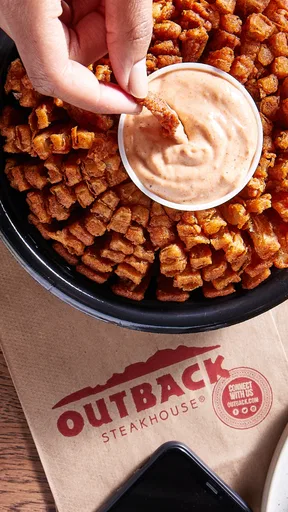
Overall, the Outback Steakhouse app is a must-have for any fan of the restaurant. It simplifies the ordering process, offers fantastic deals, and keeps you connected with your favorite steakhouse. If you're an Outback regular or even just an occasional visitor, this app is worth the download. Now, I’m off to order that Bloomin' Onion I’ve been thinking about all day!
Pros
- User-friendly interface for easy navigation.
- Exclusive offers and discounts available.
- Efficient online ordering system.
- Loyalty program rewards frequent diners.
- Detailed menu descriptions with images.
Cons
- Limited customization options for orders.
- Occasional app crashes during use.
- Requires account creation to access features.
- Location services needed for nearest store.
- Notifications can be overly frequent.
FAQs for Outback Steakhouse
What features does the Outback Steakhouse app offer?
The Outback Steakhouse app provides a variety of features including online ordering, a waitlist feature, and the ability to find the nearest restaurant location. It also offers exclusive rewards through the Dine Rewards program, allowing users to earn points for dining at Outback and other affiliated restaurants.
Is the Outback Steakhouse app free to download and use?
Yes, the Outback Steakhouse app is free to download on both Android and iOS platforms. While the app itself does not charge for its features, users will need to pay for any food purchases made through the app. Additionally, participating in the rewards program is free.
How does the Dine Rewards program work within the app?
The Dine Rewards program is integrated into the Outback Steakhouse app, allowing users to earn points for every qualified visit. Once you accumulate three qualified visits, you will receive a 50% off reward on your fourth visit. The app tracks your visits and rewards automatically.
Can I customize my orders through the Outback Steakhouse app?
Yes, the app allows users to customize their food orders according to their preferences. You can select specific menu items, modify ingredients, and add special instructions for your meal. This makes it easy to tailor your order to your dietary needs or taste preferences.
What are the system requirements for the Outback Steakhouse app?
The Outback Steakhouse app requires Android version 6.0 or later and iOS version 11.0 or later. It is compatible with most modern smartphones and tablets. Ensure your device meets these requirements to enjoy a smooth experience without technical issues.


